Comments are always appreciated... We love to know when we hit something on the nose and when we need some improvement... We love to hear from our Creative Friends...
Thank you
Creativity Shared...

Tuesday, November 3, 2009

I know I'm awful!

So I promise to start on the give-away wreath since it is November. I had this whole plan to offer you guys a choice of paper but alas most of my cameras (2 out of the 3) are not working and the one that does is out of the house with my husband most of the time.. SO... you'll just have to trust me!
So.. I promise to start the wreath by the end of the week, which means it should be done and ready to send by Sunday..... wish me luck!
~Tennille~

Saturday, October 24, 2009

Sneak Peek...

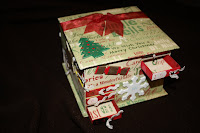
anyone guess what i am making? well i have to make 2 for a christmas party coming up in december... I just wanted to give you all a sneak peek... Enjoy...
Korie

Thursday, October 15, 2009

Giveaway Update

Hi Everyone... sorry for the break in communication. I'm not sure how but time gets away from me more than I realize. By the end of next friday I will be posting pictures and a survey to see what paper you guys would like to use for the giveaway wreath.
Hope everyone is well and check back for the update soon!

Sunday, October 4, 2009

Kimono Cards

On a recent trip to Portland, OR, I visited the Japanese Garden there. While perusing the gift shop, I came across a card that was folded to look like a kimono. Just darling!

It was similar to these ones I found online....


I had to buy it, so I could come home and make some myself!

I found this great tutorial about how to make them and got to work!

Kimono Card Tutorial

I used some paper from Amy Butler's "Lucky Flowers" collection, which worked perfectly with my kimono theme.

Here are some of the ones I made:


Have fun creating your own kimono cards! And don't forget to stop by Baubles & Buttons to find more great ideas like this!

Thursday, October 1, 2009

Want to win a Gypsy????

See the above blinky? click on it if you want a chance to enter and win a gypsy... What is a GYPSY? it basically is an IPOD for your CRICUT... instead of storing music it holds your cartridges... It can hold up to 7000 cartridges... Easier to take to a Crop... instead of lugging around all your carts you just carry around the GYPSY.. ON top of which has its own version of DESIGN studio on there... and it comes with 2 carts on there... ONLY Comes with the GYPSY... it is a prize worth 250$... YOU know you want one and you know with this ECONOMY the best way to get one is to win it..... OH YOU ONLY HAVE UNTIL THE 3RD to enter...
This wonderful website Cutting Above...They are a new blog site and they review products and does tutorials... check them out... One of my favorite creative People ROBYN the PINK STAMPER is on thier design team...
GOOD LUCK PEEPS...
Korie

Thursday, September 24, 2009

Give-Away annoucement

Since the voting ended up in a tie, I have decided to be the deciding vote. I will be making a thanksgiving/fall type wreath in the next week or so.
I will keep you all posted on it's progress and let you know when it's time to enter the give-away.
As always, thanks for visiting Creativity Shared, and there will be an update soon
~Tennille~

Wednesday, September 16, 2009

Give-away Voting Time

I love this time of year, the weather is cooling down (which isn't saying much for Vegas) and the leaves fall of the trees (or so I hear, we don't have many trees in Vegas) and we get to start thinking about Halloween costumes (way too expensive in my opinion) and Thanksgiving (mmmm sweet potatos) and then Christmas (HOLY CRAP?! ALREADY?!).... but it's making it hard for me to decide what type of wreath to do for the give away. I have to make a Halloween one for another occasion, so do I just buy more Halloween paper, or should I do Thanksgiving wreath? (It will give me more time to procrasinate) or should I just procrasinate until I can procrasinate no more and do a Christmas one? I DON"T KNOW!!!!

So, I'm going to let you decide for me.... to the right of this post ... VOTE!!! And I will do thy bidding.

Wednesday, September 9, 2009

Halloween Wreath

With September being only 1 month away and Costco already selling Christmas stuff, I thought it was OK to start on some Holiday crafts. I did some of these last year too and really like the way they add to the Holiday spirit. This one is for a friends wedding. I liked getting decor stuff as a wedding gift. It instantly adds a spirit to the home that I enjoy. I'm hoping my friend will like this (I made her something else too so I'm not totally going Scrooge on her)Also, before I go on to the tutorial, I wanted to apologize for the out-of-focus pictures. I have been having camera issues and the camera Korie gave me, I dropped on the floor and now it won't work so the camera issues continue... Anyway;

Like I said, I did these last year but didn't really add the tutorial. You will need around 400-500 strips of paper. It sounds like a lot until you consider that each piece of 12x12 will yield you around 24 strips. So that is about 16-20 pieces of 12x12. The idea is to use multiples of the same paper. In this project I used 4 pieces of the same patterned paper. Cut the 12x12 into 6x1 inch strips.


I cut them out and lay them out to wait for the next step
You can do as many different patterns as you want, I suggest adding in some solids throughout the wreath to even out the business. I find that packs work best for his kind of craft as the manufacturer already put in the time to make everything match.
After all the strips are cut up, you need to staple each strip at the ends. This can be monotonous so I find that doing this project in front of the TV helps.


I also find that if I break them down into manageable piles then I can get through them easier.


As I staple them, they go into a box or bag for safe keeping. My daughter could make a huge mess with these!!
I used a standard 10 inch wreath for this project, you can go as big or as small as you would like (obviously) you would just need to adjust the amount of paper and if you went smaller I would go 4x1.

Once everything is cut and stapled the only thing left is attaching them to the form. When I read about this project in Creating Keepsakes, the person glue-gunned hers on. This didn't work for me, so I went to straight pins. You can buy a box of straight pins at Walmart for less than 2 dollars. I would also recommend buying a thimble as the constant pushing in of the pins gets hard on your finger. I also found that the white styrofoam ones are easier to push into but since that's not what I had on hand and money is tight, I went with what I had.


And the final result is:

Close up


Hanging from the door.
All in all, this project took 2 nights - once the strips start going on it's pretty easy to do. Just remember your thimble!!!
So... is this something you gals would want to win in a giveaway? If so leave some comments and there may be an annoucement in the near future.
Thanks for stopping by
~Tennille~

Tuesday, September 1, 2009

Recipe Magnet Board

I have had some need to make gifts for people recently. I have seen these magnet boards used for all types of things, from message board to picture frames. I love the idea of usind these in the kitchen as a holder for recipes. When ever I use a recipe card or a book, it always ends up with gunk all over it because an egg smear went across it or I put my spoon down on it. With these, the recipes are up and off the counter.

I bought these boards pre-made and the bend was already in them when I got them. They were pretty reasonable at 4 dollars a piece. (If you wan the link, please leave a request in the comments section and I'll get it to you) In addition to the board I bought some buttons to put over the magnets to make them pretty. Everything else I had on-hand.


This is the beginning product. I got 3 with 3 magnets and shipping for 25 bucks.
I choose my paper, accesories and buttons.
I used Beacon's 3 in 1 Advanced craft Glue

If you haven't used this, it's awesome! I have used it in all kinds of papercrafts, and even though it has a bit of a smell to it, it has worked fantasticly for me! I tried using a glue gun, but it just didn't work with the metal, I don't know if this is because you have to buy a special glue for the glue gun but it didn't work.
I covered the metal with my paper of choice, for this example it was Basil Basics Black. I put the glue on the metal, all the way around, you have to sort of rub the glue in certain areas to make it stick, but once it grabs hold it's good forever!
I have had this cute American Crafts paper for ever and have never been able to cut it up because I have loved the flowers so much. This particular person has a black and white kitchen so I thought this was a great way to add a punch of color without going over board. So I cut the flowers out of the paper and stuck them on with regular glue.
I used a glue gun to attach these silver button covers (from Walmart $1.27 for 4)to the magnets and to secure down the ribbon.
Here is the final result

Here are the other two I completed also.

This was done with paper by g c d studios (called large tulips), the buttons are from walmart and the ribbon is American crafts. Letter is the Tear Drop Cartridge from Cricut.

This is Chatterbox - greenhouse stripes paper, the cuutin'up cartridge by critcut and ribbon from American Crafts. The button overs are from walmart (4 for $1.27)

Saturday, August 15, 2009

Button Magnets

One of my obsessions as of late is making button magnets. I love buttons, because they can be so unique and have a personality all their own. I recently visited an anitque store up in Cedar City, UT and got some great vintage buttons to use.
Method:
First, you need to make sure the back of the magnet is flat. If not, you can clip any pieces off and sand it down. Then, I simply attach a magnet to the back of the buttons, usually with hot glue. I have been packaging them in sets of three in magnetic tins. I love being able to put the whole tin on the refrigerator, plus being able to use the magnets inside too.
Supplies:
I get the buttons wherever I can. I usually get the magnets at Michael's Craft Store, where they are priced the most affordably. The tins are from IKEA.

Here are my latest creations....


I love the green and yellow combination of the last one.

Thursday, August 13, 2009

Lost Socks

I have been working on this project for a while... not that it's hard, it just I got distracted, went on vacation, wondered about what I should add.... etc. So this is a gift for a good friend of mine who just had a baby girl last month.

I got the square from the dollar tree (for $1!) The paper is DCWV pack that I bought for my daughters scrapbook use. I edged the corners with the tea die distress ink.

This is a pretty low cost project... I think all together it cost less than 5 bucks, including the socks!


Saturday, August 8, 2009

Baby Girl

This lay out i love it turned out fabulous... this is a true 12x12 page for CM for my 2009 Album... I used Heidi Swap flower stickers and the black with white lettering is from her collection as well, Basic Grey for the buttons, Cricut Cartridge New arrival for the New arrival lettering...

Havent been creative in a while so this was nice... to get me back in the groove if only for a bit... need to do more crafting... and i need journaling on this baby...

Tuesday, July 21, 2009

latest creations

i've been storing them up! actually i have just done these in the last couple of weeks. if you have any questions about any of them in particular, just ask!!


Saturday, July 11, 2009

Digital Scrapbooking...


Here is another layout I did using CM Pet Digital Kit... and I also used for the title font CM Simple digital Font, as well as CM Digital Embellishments-Sewing Room stitches... It is simple and sweet... for the font on the tag for the journaling i used CK Newsprint...

Tuesday, July 7, 2009

OK

what no suggestions on tutorials... ok well then i will have to think of something else... it could be a technique that you would like to learn and we could do a step by step... I have been sick lately and not so creative and the is the lack of posts on my end... have a great day

Thursday, June 11, 2009

I need help...

Ok y'all if you could do me a huge favor... I need ideas on the types of tutorials we need... I have run out of my 4 ideas of what to do tutorials on... If anyone has any questions in re to Memory manager 3.0 or SBC+ software and would like a step by step tutorial, please leave a comment and tell me what exactly you would like... Thank you
Have a great thursday...
It has been one heck of a week... been sick and trying to get back into the groove of things since we took the troop(girl scouts) out camping... Not to mention we are getting new counter tops (kitchen) put in tomorrow...
Korie

Thursday, June 4, 2009

How to make a blog header/Title

How to Make a Blog Header

again let me know if there is anything i can do to improve these... Let me know if they are helpful or not... Enjoy Thursday's tutorial...
Korie

Thursday, May 28, 2009

How to Add your CM SBC+ background to Blogger

How to Add Blog Background to Blogger

Enjoy... again if anyone has any comments whether good or bad please let me know... thank you and good luck... Korie

Thursday, May 21, 2009

How to make your own Blog Background

How to Make a Blog Background

Make sure to leave a comment for suggestions... did this work for you or not... I need to know what is working and what is not...

Thursday, May 14, 2009

Adding MY STUFF on SBC+

Adding MY STUFF to SBC+
from now on Thursdays will be Tutorial Thursdays... Where I will post a new tutorial on the either SBC+ or Memory Manager 3.0 or whatever... Hope to see you on Thursdays... if you cant read the tutorial then click on either the link or the + sign...

Blog Archive